Getting started with calibre
This tutorial fits a classifier, calibrates its probabilities on separate data, and evaluates the result on observations used by neither fit.
The data have three roles:
The training set fits the classifier.
The calibration set fits the calibration map.
The test set evaluates the completed pipeline.
Reusing classifier-training predictions to fit the calibrator leaks training-set optimism into the calibration map. Reusing calibration observations for evaluation makes an isotonic-family fit look perfectly calibrated by construction.
import matplotlib.pyplot as plt
import numpy as np
from sklearn.ensemble import RandomForestClassifier
from sklearn.model_selection import train_test_split

from calibre import (
    CenteredIsotonicCalibrator,
    IsotonicCalibrator,
    NearlyIsotonicCalibrator,
    SplineCalibrator,
    brier_score,
    calibration_curve,
    score_decomposition,
)

RANDOM_STATE = 42
random_generator = np.random.default_rng(RANDOM_STATE)
Create the three data sets
The classifier below is deliberately flexible enough that its training predictions would be misleading calibration data.
n_observations = 4000
features = random_generator.normal(size=(n_observations, 5))
linear_predictor = (
    features[:, 0]
    + 0.5 * features[:, 1]
    - 0.3 * features[:, 2]
    + random_generator.normal(scale=0.5, size=n_observations)
)
outcomes = (linear_predictor > 0).astype(int)

(
    X_train,
    X_remaining,
    y_train,
    y_remaining,
) = train_test_split(
    features,
    outcomes,
    test_size=0.5,
    stratify=outcomes,
    random_state=RANDOM_STATE,
)
(
    X_calibration,
    X_test,
    y_calibration,
    y_test,
) = train_test_split(
    X_remaining,
    y_remaining,
    test_size=0.5,
    stratify=y_remaining,
    random_state=RANDOM_STATE,
)

print(
    f"{len(X_train)} training, {len(X_calibration)} calibration, "
    f"and {len(X_test)} test observations"
)
2000 training, 1000 calibration, and 1000 test observations
Fit the classifier and calibrator
Only the classifier sees the training set. The calibrator sees the classifier’s probabilities and labels on the calibration set.
classifier = RandomForestClassifier(
    n_estimators=200,
    min_samples_leaf=5,
    random_state=RANDOM_STATE,
)
classifier.fit(X_train, y_train)

calibration_predictions = classifier.predict_proba(X_calibration)[:, 1]
test_predictions = classifier.predict_proba(X_test)[:, 1]

calibrator = CenteredIsotonicCalibrator(enable_diagnostics=True)
calibrator.fit(calibration_predictions, y_calibration)
calibrated_test_predictions = calibrator.transform(test_predictions)

print(
    "test prediction range before calibration: "
    f"[{test_predictions.min():.3f}, {test_predictions.max():.3f}]"
)
print(
    "test prediction range after calibration:  "
    f"[{calibrated_test_predictions.min():.3f}, "
    f"{calibrated_test_predictions.max():.3f}]"
)
test prediction range before calibration: [0.002, 0.999]
test prediction range after calibration:  [0.000, 1.000]
Evaluate on the test set
Use a proper score to compare complete prediction pipelines. The Brier score rewards calibration and resolution, so a method cannot improve it merely by flattening all predictions toward the base rate. The CORP decomposition shows how much of the score comes from miscalibration and discrimination.
def evaluation_row(name, predictions):
    """Return held-out Brier and CORP components for one prediction vector."""
    decomposition = score_decomposition(y_test, predictions)
    return {
        "method": name,
        "brier": brier_score(y_test, predictions),
        "miscalibration": decomposition["miscalibration"],
        "discrimination": decomposition["discrimination"],
        "distinct_predictions": np.unique(predictions).size,
    }


comparison = [
    evaluation_row("uncalibrated", test_predictions),
    evaluation_row("centered isotonic", calibrated_test_predictions),
]

for row in comparison:
    print(
        f"{row['method']:18s}  Brier {row['brier']:.4f}  "
        f"MCB {row['miscalibration']:.4f}  "
        f"DSC {row['discrimination']:.4f}  "
        f"distinct {row['distinct_predictions']}"
    )
uncalibrated        Brier 0.0879  MCB 0.0070  DSC 0.1692  distinct 1000
centered isotonic   Brier 0.0863  MCB 0.0055  DSC 0.1692  distinct 801
Lower Brier and MCB are better. Higher DSC means the predictions retain more useful separation between observations. Calibration can lower MCB while also lowering DSC, so report both or compare the proper score directly.
Plot the held-out reliability curves
uncalibrated_event_rates, uncalibrated_prediction_means, _ = calibration_curve(
    y_test,
    test_predictions,
    n_bins=10,
)
calibrated_event_rates, calibrated_prediction_means, _ = calibration_curve(
    y_test,
    calibrated_test_predictions,
    n_bins=10,
)

figure, axes = plt.subplots(1, 2, figsize=(11, 4.5), sharex=True, sharey=True)
for axis, title, prediction_means, event_rates in (
    (
        axes[0],
        "Before calibration",
        uncalibrated_prediction_means,
        uncalibrated_event_rates,
    ),
    (
        axes[1],
        "After calibration",
        calibrated_prediction_means,
        calibrated_event_rates,
    ),
):
    axis.plot([0, 1], [0, 1], "k--", alpha=0.5, label="ideal")
    axis.plot(prediction_means, event_rates, "o-")
    axis.set_title(title)
    axis.set_xlabel("Mean prediction")
    axis.grid(alpha=0.3)

axes[0].set_ylabel("Observed event rate")
axes[0].legend()
figure.tight_layout()
plt.show()
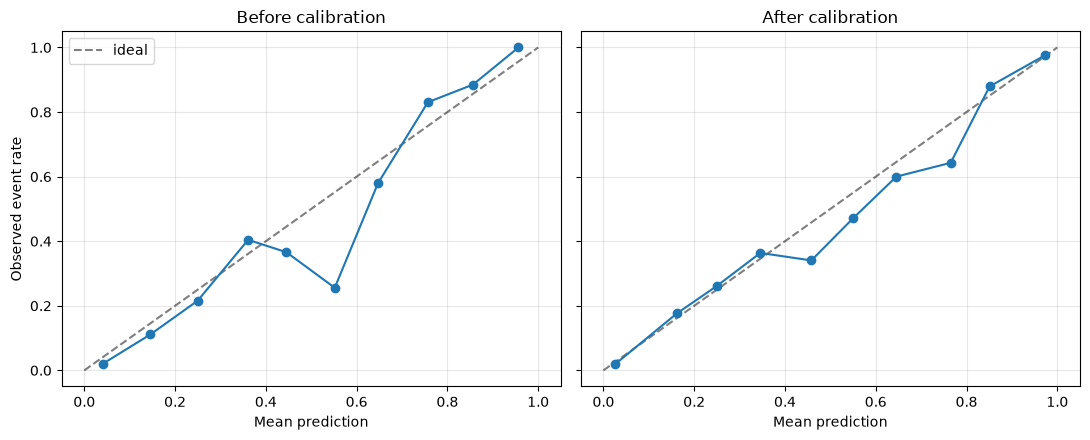
The plotted bins are descriptive and depend on the binning rule. Use the held-out proper score and CORP decomposition for method comparison.
Compare candidate calibrators
Fit every candidate on the same calibration observations and compare their predictions on the same untouched observations. The comparison set becomes a selection set once you choose a winner; reserve another test set when you need an unbiased performance estimate after selection.
calibrators = {
    "isotonic": IsotonicCalibrator(),
    "centered isotonic": CenteredIsotonicCalibrator(),
    "nearly isotonic": NearlyIsotonicCalibrator(),
    "spline": SplineCalibrator(n_knots=5),
}

candidate_rows = [evaluation_row("uncalibrated", test_predictions)]
for name, candidate in calibrators.items():
    candidate.fit(calibration_predictions, y_calibration)
    candidate_predictions = candidate.transform(test_predictions)
    candidate_rows.append(evaluation_row(name, candidate_predictions))

for row in sorted(candidate_rows, key=lambda item: item["brier"]):
    print(
        f"{row['method']:18s}  Brier {row['brier']:.4f}  "
        f"MCB {row['miscalibration']:.4f}  "
        f"DSC {row['discrimination']:.4f}  "
        f"distinct {row['distinct_predictions']}"
    )
spline              Brier 0.0858  MCB 0.0050  DSC 0.1692  distinct 997
centered isotonic   Brier 0.0863  MCB 0.0055  DSC 0.1692  distinct 801
isotonic            Brier 0.0871  MCB 0.0036  DSC 0.1665  distinct 38
nearly isotonic     Brier 0.0874  MCB 0.0039  DSC 0.1665  distinct 44
uncalibrated        Brier 0.0879  MCB 0.0070  DSC 0.1692  distinct 1000
No calibrator wins every data-generating process. Choose with a proper score on data outside the calibrator fit, then inspect calibration error and retained resolution to understand the result.