Basic usage examples
Sphinx runs every example on this page when it builds the documentation.
Basic trend estimation
Let’s start with a simple example using sample time series data:
import pandas as pd
import numpy as np
import matplotlib.pyplot as plt
from incline import naive_trend, sgolay_trend, smoothing_spline_trend

# Load sample data
RANDOM_STATE = 42
rng = np.random.default_rng(RANDOM_STATE)
dates = pd.date_range('2020-01-01', periods=30, freq='D')
# Create a time series with trend + noise
trend_component = 0.5 * np.arange(30)
noise = rng.normal(0, 1, 30)
values = 100 + trend_component + noise

df = pd.DataFrame({'value': values}, index=dates)

print("Sample time series data:")
print(df.head())
print(f"\nData shape: {df.shape}")
Sample time series data:
                 value
2020-01-01  100.304717
2020-01-02   99.460016
2020-01-03  101.750451
2020-01-04  102.440565
2020-01-05  100.048965

Data shape: (30, 1)
Comparing naive differences, splines, and Savitzky-Golay
# Apply all three basic methods
naive_result = naive_trend(df)
spline_result = smoothing_spline_trend(df, penalty=10)
sgolay_result = sgolay_trend(df, window_length=7, degree=3)

# Create comparison plot
fig, (ax1, ax2) = plt.subplots(2, 1, figsize=(12, 8))

# Plot 1: Original data and smoothed versions
ax1.plot(df.index, df['value'], 'ko-', alpha=0.6, markersize=4, label='Original Data')
ax1.plot(spline_result.index, spline_result['smoothed_value'], 'r-', linewidth=2, label='Spline Smoothed')
ax1.plot(sgolay_result.index, sgolay_result['smoothed_value'], 'b-', linewidth=2, label='Savitzky-Golay Smoothed')
ax1.set_ylabel('Value')
ax1.set_title('Time Series Smoothing Methods')
ax1.legend()
ax1.grid(True, alpha=0.3)

# Plot 2: Derivative estimates (trends)
ax2.plot(naive_result.index, naive_result['derivative_value'], 'g-', linewidth=2, label='Naive Trend', alpha=0.8)
ax2.plot(spline_result.index, spline_result['derivative_value'], 'r-', linewidth=2, label='Spline Trend')
ax2.plot(sgolay_result.index, sgolay_result['derivative_value'], 'b-', linewidth=2, label='S-G Trend')
ax2.axhline(y=0.5, color='black', linestyle='--', alpha=0.7, label='True Trend (0.5)')
ax2.axhline(y=0, color='gray', linestyle='-', alpha=0.5)
ax2.set_ylabel('Trend (derivative)')
ax2.set_xlabel('Date')
ax2.set_title('Trend Estimates')
ax2.legend()
ax2.grid(True, alpha=0.3)

plt.tight_layout()
plt.show()
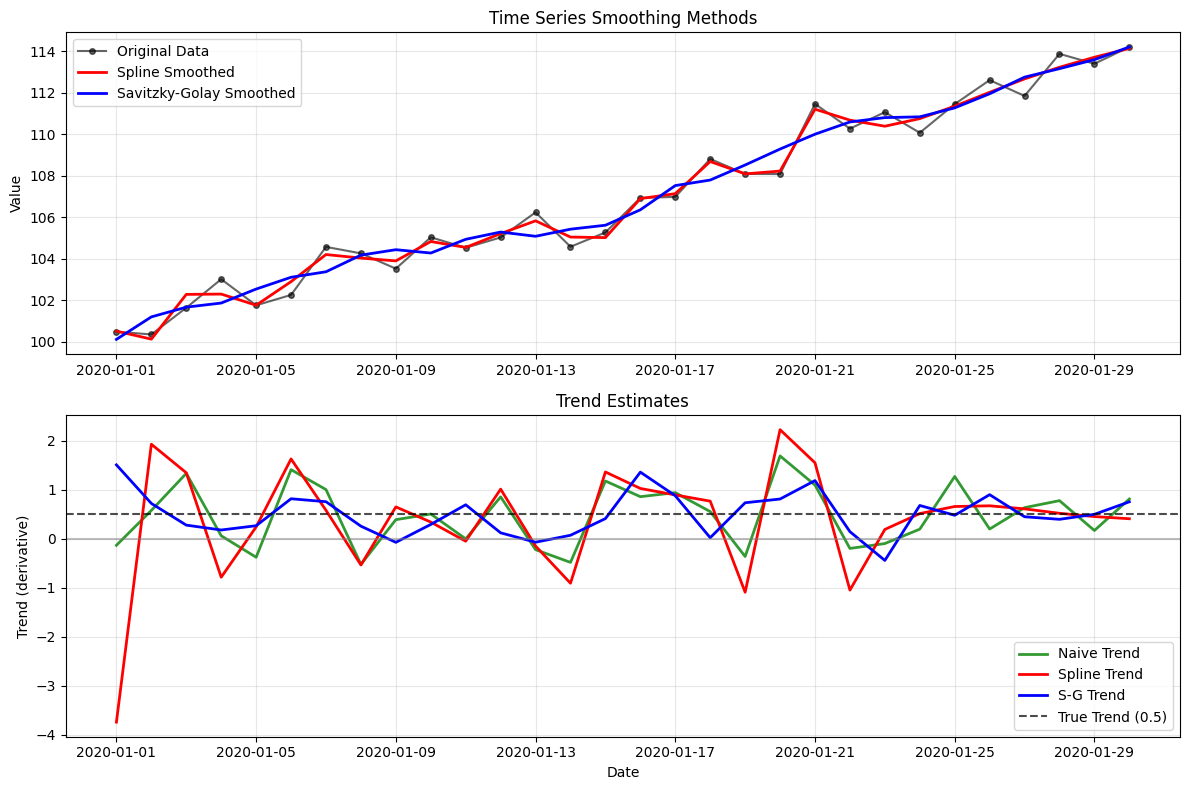
Error on this simulated series
# Calculate performance metrics
true_derivative = 0.5  # Known true trend

methods = {
    'Naive': naive_result['derivative_value'],
    'Spline': spline_result['derivative_value'],
    'Savitzky-Golay': sgolay_result['derivative_value']
}

performance_metrics = {}
for method_name, derivatives in methods.items():
    # Remove NaN values for fair comparison
    valid_derivatives = derivatives.dropna()

    mse = np.mean((valid_derivatives - true_derivative) ** 2)
    bias = np.mean(valid_derivatives - true_derivative)
    standard_deviation = np.std(valid_derivatives)

    performance_metrics[method_name] = {
        'mean_squared_error': mse,
        'bias': bias,
        'standard_deviation': standard_deviation,
        'valid_points': len(valid_derivatives)
    }

# Create performance comparison table
performance_df = pd.DataFrame(performance_metrics).T
print("Performance Comparison (True trend = 0.5):")
print("=" * 50)
print(performance_df.round(4))
Performance Comparison (True trend = 0.5):
==================================================
                mean_squared_error    bias  standard_deviation  valid_points
Naive                       0.3896 -0.0179              0.6239          30.0
Spline                      0.0107  0.0136              0.1027          30.0
Savitzky-Golay              0.1994  0.0278              0.4457          30.0
Sensitivity to the smoothing parameter
Understanding how smoothing parameters affect results:
# Test different roughness penalties for the smoothing spline
penalties = [0.1, 1, 10, 100, 1000]
colors = ['purple', 'blue', 'green', 'orange', 'red']

fig, (ax1, ax2) = plt.subplots(2, 1, figsize=(12, 8))

# Plot smoothed curves
ax1.plot(df.index, df['value'], 'ko-', alpha=0.6, markersize=4, label='Original Data')
for i, penalty in enumerate(penalties):
    result = smoothing_spline_trend(df, penalty=penalty)
    ax1.plot(result.index, result['smoothed_value'],
            color=colors[i], linewidth=2, label=f'penalty = {penalty}')

ax1.set_ylabel('Value')
ax1.set_title('Effect of Smoothing Parameter on Spline Fits')
ax1.legend(bbox_to_anchor=(1.05, 1), loc='upper left')
ax1.grid(True, alpha=0.3)

# Plot corresponding derivatives
for i, penalty in enumerate(penalties):
    result = smoothing_spline_trend(df, penalty=penalty)
    ax2.plot(result.index, result['derivative_value'],
            color=colors[i], linewidth=2, label=f'penalty = {penalty}')

ax2.axhline(y=0.5, color='black', linestyle='--', alpha=0.7, label='True Trend')
ax2.axhline(y=0, color='gray', linestyle='-', alpha=0.5)
ax2.set_ylabel('Trend (derivative)')
ax2.set_xlabel('Date')
ax2.set_title('Effect of Smoothing Parameter on Trend Estimates')
ax2.legend(bbox_to_anchor=(1.05, 1), loc='upper left')
ax2.grid(True, alpha=0.3)

plt.tight_layout()
plt.show()

# Calculate MSE for each smoothing parameter
print("\nSmoothing Parameter Analysis:")
print("=" * 35)
for penalty in penalties:
    result = smoothing_spline_trend(df, penalty=penalty)
    mse = np.mean((result['derivative_value'] - true_derivative) ** 2)
    print(f"penalty = {penalty:6.1f}: MSE = {mse:.4f}")
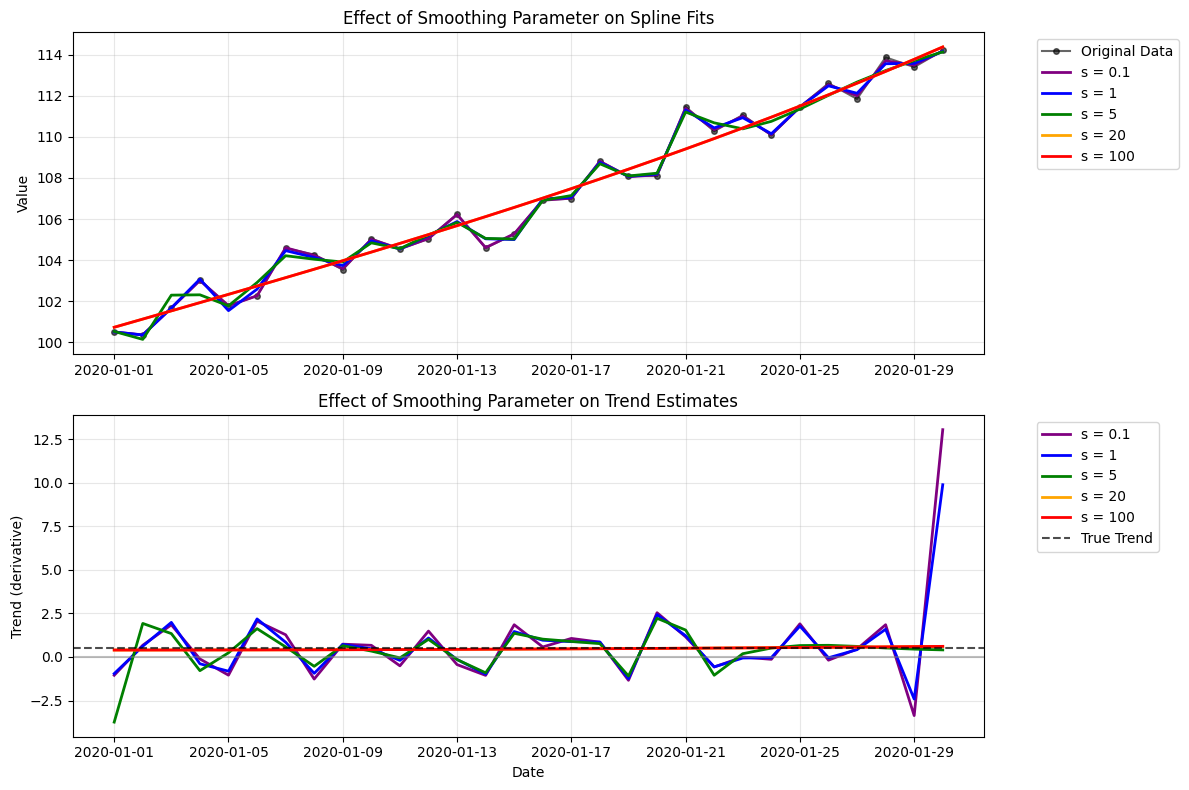
Smoothing Parameter Analysis:
===================================
penalty =    0.1: MSE = 0.2890
penalty =    1.0: MSE = 0.0393
penalty =   10.0: MSE = 0.0107
penalty =  100.0: MSE = 0.0016
penalty = 1000.0: MSE = 0.0003
Trend, seasonality, noise, and outliers
# Create a more complex time series with multiple characteristics
n_points = 60
dates = pd.date_range('2020-01-01', periods=n_points, freq='D')

# Complex signal: trend + seasonality + noise + outliers
t = np.arange(n_points)
trend = 0.3 * t
seasonal = 5 * np.sin(2 * np.pi * t / 7)  # Weekly seasonality
noise = rng.normal(0, 2, n_points)

# Add some outliers
outlier_indices = [15, 35, 50]
complex_values = 100 + trend + seasonal + noise
for idx in outlier_indices:
    complex_values[idx] += rng.choice([-10, 10])

complex_df = pd.DataFrame({'value': complex_values}, index=dates)

# Apply different methods
methods_results = {
    'Naive': naive_trend(complex_df),
    'Smoothing spline (penalty 1)': smoothing_spline_trend(complex_df, penalty=1),
    'Smoothing spline (penalty 100)': smoothing_spline_trend(complex_df, penalty=100),
    'S-G (window 7)': sgolay_trend(complex_df, window_length=7, degree=3),
    'S-G (window 15)': sgolay_trend(complex_df, window_length=15, degree=3),
}

# Plot results
fig, (ax1, ax2) = plt.subplots(2, 1, figsize=(12, 10))

# Original data
ax1.plot(complex_df.index, complex_df['value'], 'k-', alpha=0.6, linewidth=1, label='Original Data')
ax1.scatter([complex_df.index[i] for i in outlier_indices],
           [complex_df.iloc[i]['value'] for i in outlier_indices],
           color='red', s=50, zorder=5, label='Outliers')

# Show some smoothed curves
colors_dict = {
    'Smoothing spline (penalty 1)': 'blue',
    'Smoothing spline (penalty 100)': 'red',
    'S-G (window 15)': 'green',
}
for name, color in colors_dict.items():
    result = methods_results[name]
    if 'smoothed_value' in result.columns:
        ax1.plot(result.index, result['smoothed_value'],
                color=color, linewidth=2, label=name)

ax1.set_ylabel('Value')
ax1.set_title('Complex Time Series: Trend + Seasonality + Outliers')
ax1.legend()
ax1.grid(True, alpha=0.3)

# Compare trend estimates
for name, result in methods_results.items():
    ax2.plot(result.index, result['derivative_value'],
            linewidth=2, label=name, alpha=0.8)

ax2.axhline(y=0.3, color='black', linestyle='--', alpha=0.7, label='True Trend (0.3)')
ax2.axhline(y=0, color='gray', linestyle='-', alpha=0.5)
ax2.set_ylabel('Trend (derivative)')
ax2.set_xlabel('Date')
ax2.set_title('Trend Estimates - Different Methods Handle Complexity Differently')
ax2.legend(bbox_to_anchor=(1.05, 1), loc='upper left')
ax2.grid(True, alpha=0.3)

plt.tight_layout()
plt.show()

print("Method Comparison on Complex Data:")
print("=" * 40)
for name, result in methods_results.items():
    derivatives = result['derivative_value'].dropna()
    mse = np.mean((derivatives - 0.3) ** 2)
    mean_trend = np.mean(derivatives)
    print(f"{name:12s}: MSE = {mse:.3f}, Mean = {mean_trend:.3f}")
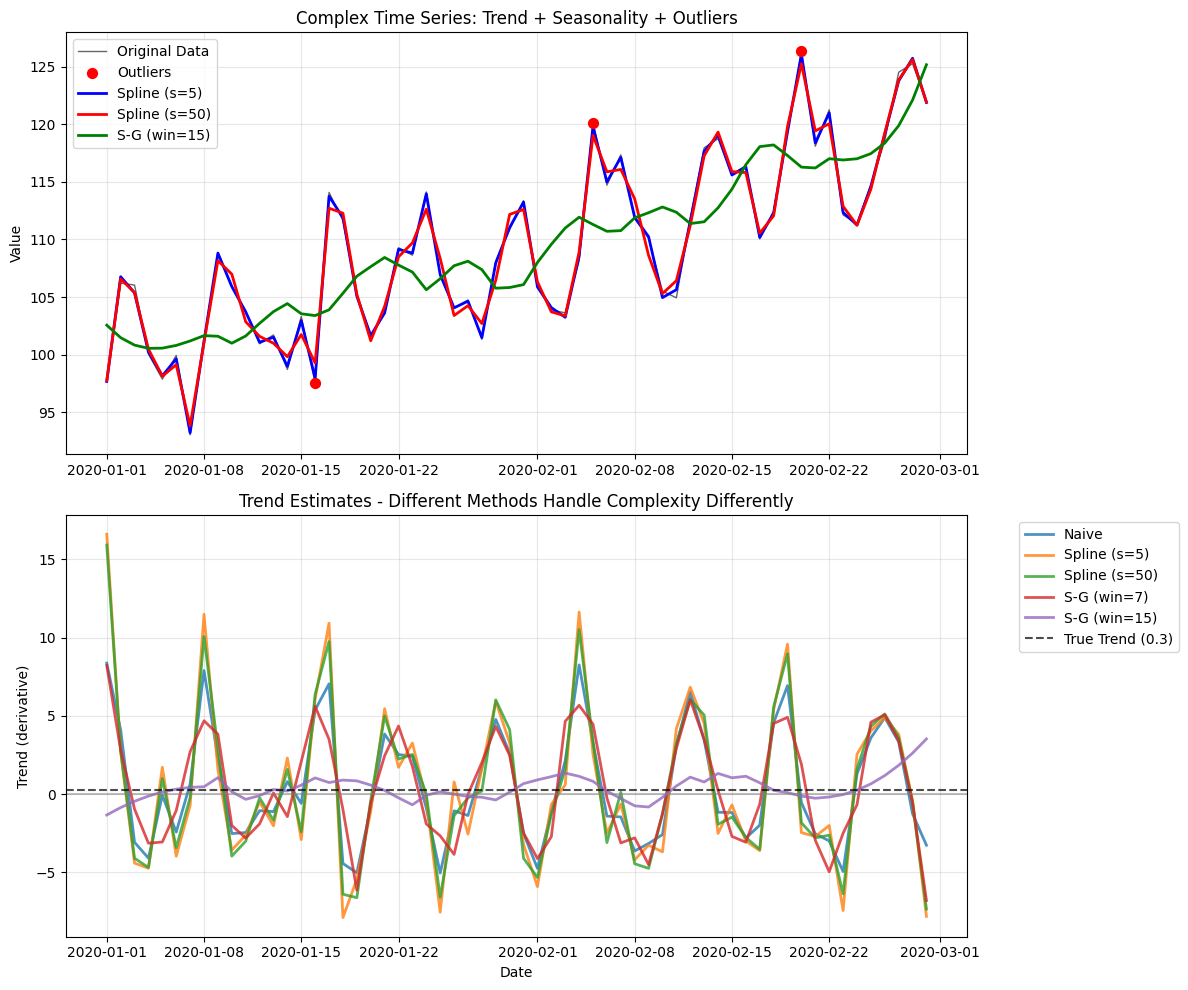
Method Comparison on Complex Data:
========================================
Naive       : MSE = 8.263, Mean = 0.247
Smoothing spline (penalty 1): MSE = 3.073, Mean = 0.297
Smoothing spline (penalty 100): MSE = 0.090, Mean = 0.301
S-G (window 7): MSE = 7.748, Mean = 0.230
S-G (window 15): MSE = 0.518, Mean = 0.289
Choosing among these methods
Method |
Useful role |
Main limitation |
|---|---|---|
Naive differences |
An unsmoothed baseline |
Amplifies noise and has one-sided boundary estimates |
Smoothing spline |
Smooth estimates on regular or irregular axes |
Results depend on the roughness penalty |
Savitzky-Golay |
Local polynomial smoothing on a regular grid |
Results depend on the window and degree |