Nadaraya-Watson Regression with hessband
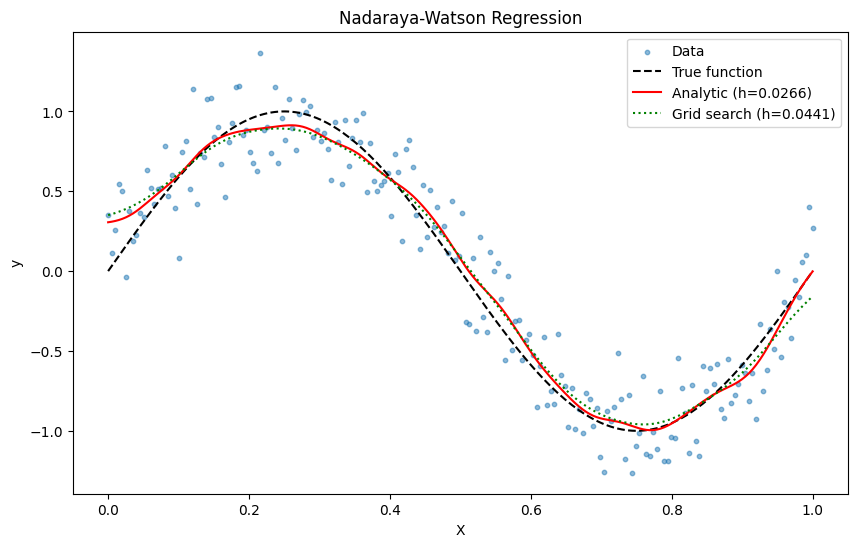
This notebook demonstrates how to use hessband to perform Nadaraya-Watson kernel regression. We will select the bandwidth using both the analytic method and grid search, and compare the results.
[1]:
import time

import matplotlib.pyplot as plt
import numpy as np

from hessband import nw_predict, select_nw_bandwidth
/tmp/ipykernel_2672/4096575133.py:6: DeprecationWarning: hessband is deprecated. Use 'pip install hbw' instead. See https://github.com/finite-sample/hbw
  from hessband import nw_predict, select_nw_bandwidth
1. Generate Synthetic Data
[2]:
np.random.seed(0)
X = np.linspace(0, 1, 200)
true_y = np.sin(2 * np.pi * X)
y = true_y + 0.2 * np.random.randn(200)
2. Bandwidth Selection
We will now select the optimal bandwidth using two methods: analytic and grid search.
[3]:
# Analytic method
start_time = time.time()
h_analytic = select_nw_bandwidth(X, y, method="analytic")
analytic_time = time.time() - start_time

# Grid search method
start_time = time.time()
h_grid = select_nw_bandwidth(X, y, method="grid")
grid_time = time.time() - start_time

print(f"Analytic method: h = {h_analytic:.4f}, time = {analytic_time:.4f}s")
print(f"Grid search method: h = {h_grid:.4f}, time = {grid_time:.4f}s")
Analytic method: h = 0.0266, time = 0.0105s
Grid search method: h = 0.0441, time = 0.0291s
The analytic method is much faster and gives a comparable bandwidth.
3. Perform Regression and Plot Results
[4]:
y_pred_analytic = nw_predict(X, y, X, h_analytic)
y_pred_grid = nw_predict(X, y, X, h_grid)

plt.figure(figsize=(10, 6))
plt.scatter(X, y, label="Data", alpha=0.5, s=10)
plt.plot(X, true_y, label="True function", color="black", linestyle="--")
plt.plot(X, y_pred_analytic, label=f"Analytic (h={h_analytic:.4f})", color="red")
plt.plot(
    X, y_pred_grid, label=f"Grid search (h={h_grid:.4f})", color="green", linestyle=":"
)
plt.legend()
plt.title("Nadaraya-Watson Regression")
plt.xlabel("X")
plt.ylabel("y")
plt.show()